OpenClaw

Enter your details and passcode to access materials

Contact the instructor for access

OpenClaw Workshop 1 / 17

OpenClaw Workshop

The Future of AI — March 19, 2026

Claude Code OpenClaw AI Agents Security Deployment
press arrow to begin
Block 1: Intro — The Moment 2 / 17
01 — The Moment

What Is OpenClaw?

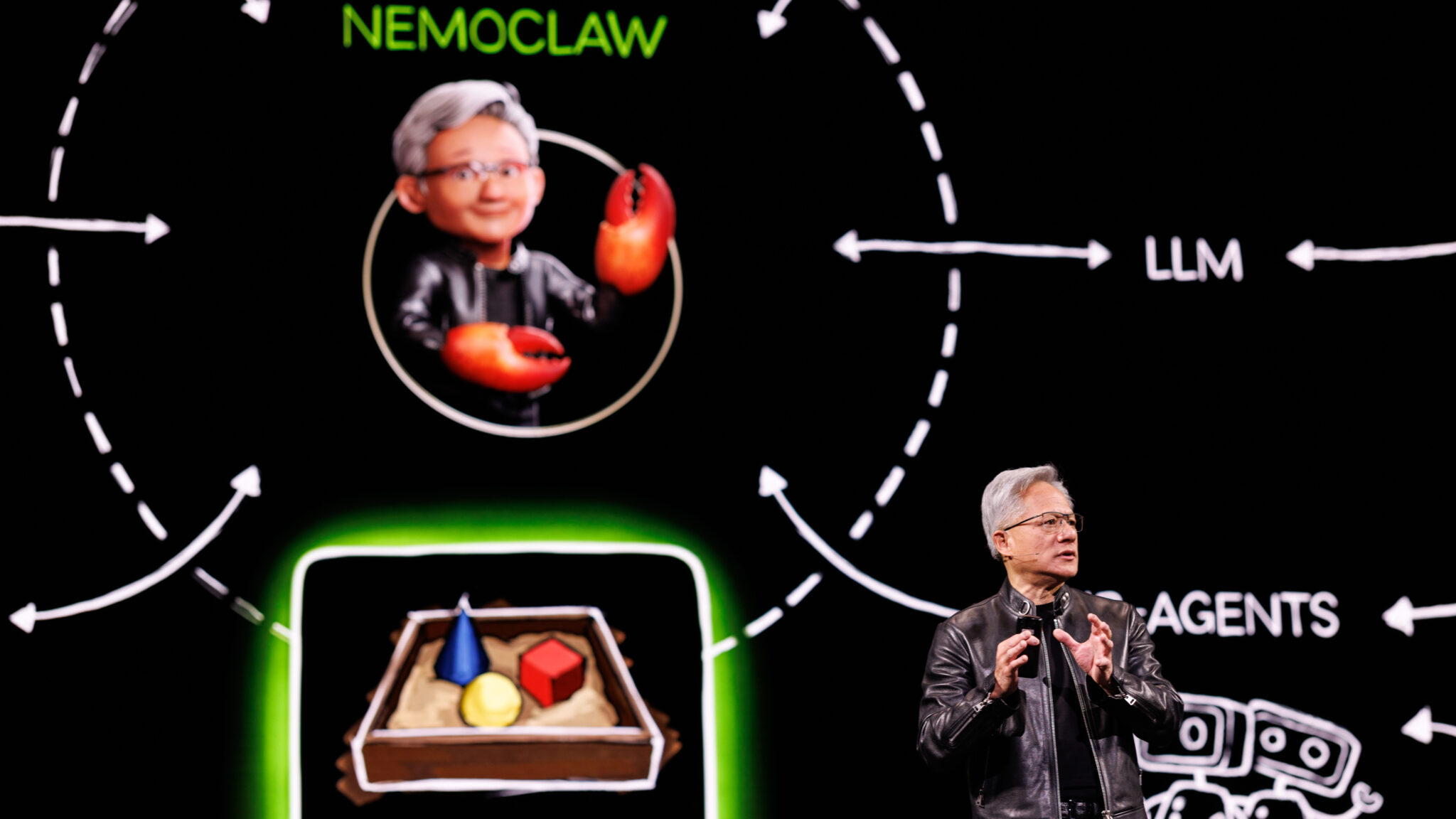
Jensen Huang presenting NemoClaw at GTC 2026

Jensen Huang talked about it at GTC. It became the fastest-adopted piece of software in a generation. It's not just a tool — it's a movement that's reshaping how we work with AI.

Fastest Adoption

Broke records for developer adoption. The world noticed — this isn't just another AI wrapper.

A Global Movement

Not just Silicon Valley. Developers, founders, and teams worldwide are building with it right now.

Beyond Chat

AI that doesn't just answer questions — it takes action across your entire digital life.

This isn't about chatbots anymore. This is about AI that works for you — continuously, across everything.
Block 1: Intro — Demo: Personal 3 / 17
02 — Show the Candy

How I Use It — Personal

Let me show you how this actually works in my daily life. These are real workflows I run every day.
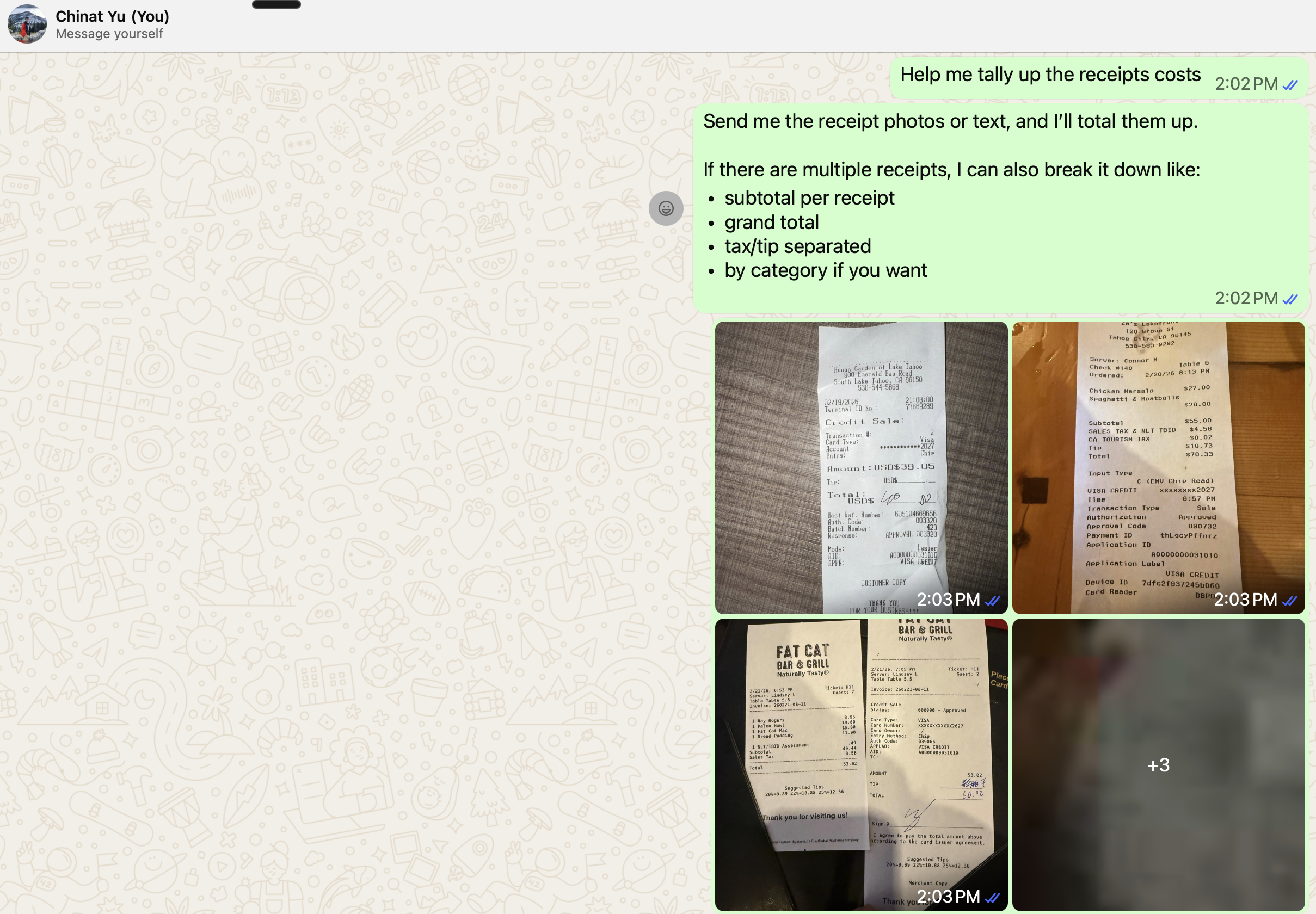
Sending receipts to AI agent via WeChat
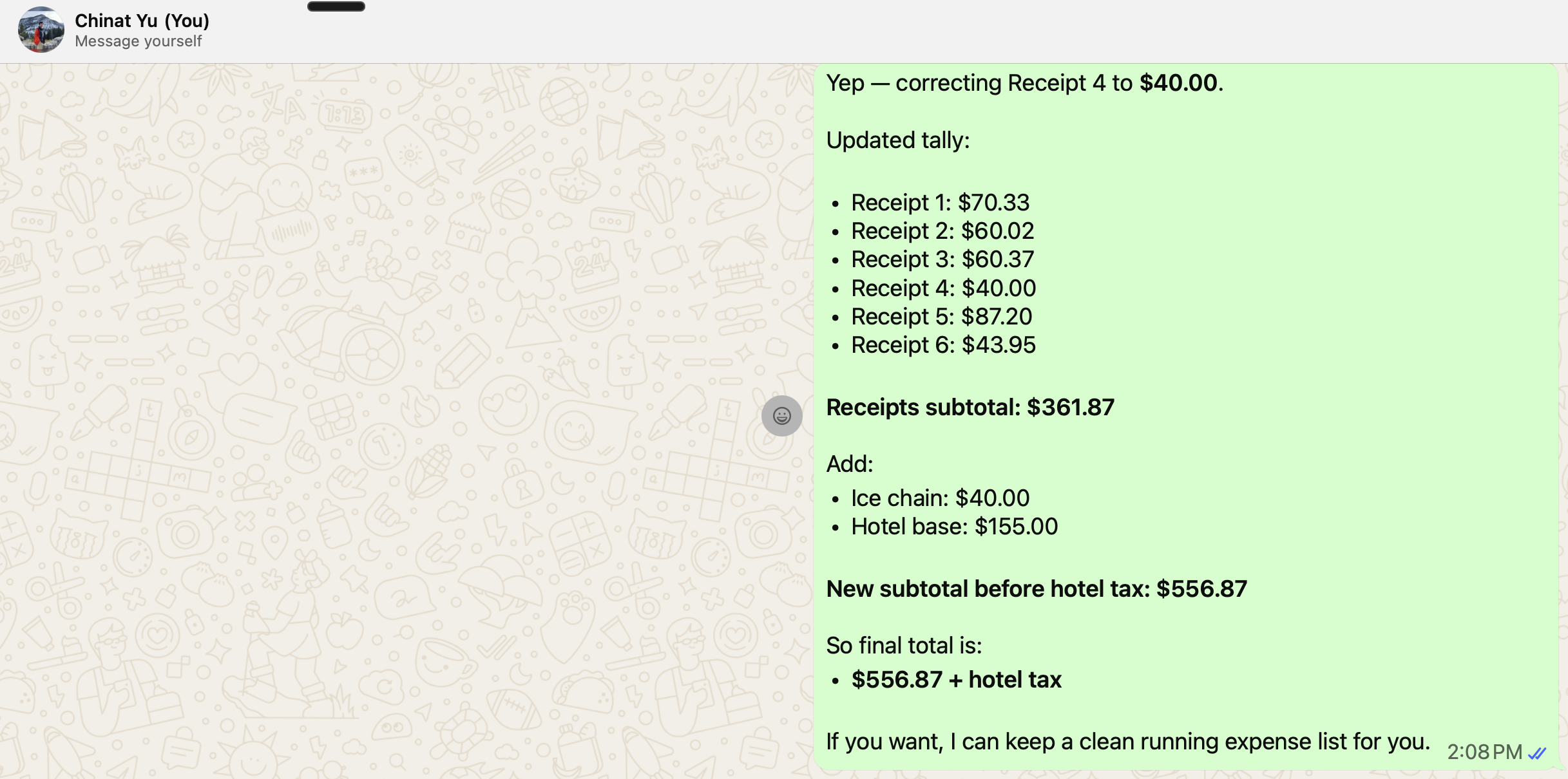
AI agent tallying up all receipts automatically

Receipt Tracking

Take a photo of a receipt → AI extracts the data → automatically logged and categorized. No manual entry.

Todos & Calendar

Say "remind me to follow up with Jason on Thursday" → creates the todo, adds it to calendar, sets the reminder. Done.

Live demo time: Let's see this in action.
Block 1: Intro — Demo: Professional 4 / 17
03 — Show the Candy

How I Use It — Professional

The real power shows up at work. Here's how companies and teams are using this today.

Meeting → PDF & Email

Meeting transcript comes in → AI generates a full PDF proposal, drafts follow-up emails to each attendee, creates action items. One command.

Company Workflows

Teams are automating onboarding docs, weekly reports, customer follow-ups, and internal knowledge base updates — all through AI agents.

Key insight: The best use cases aren't the flashiest ones. They're the boring, repetitive workflows you do every week that eat up hours of your time.
Breakout 1: How Do You Want to Use AI? 5 / 17
Breakout Room

How do you want to use AI to improve?

Go into breakout rooms and discuss. Add your ideas to the shared doc.

Open Shared Google Doc Everyone go in and share your thoughts
Block 1: Intro — Quick Setup Demo 6 / 17
Live Demo

Get Off the Ground in 5 Minutes

Before we go deeper into security and the landscape, let's get you hands-on. Emergent lets you deploy a cloud-hosted OpenClaw agent with zero local setup.

What We'll Do

  • Sign up for Emergent
  • Deploy an OpenClaw agent in the cloud
  • Send it a task and watch it work
  • You can follow along right now!

Why Emergent First

  • No local install needed
  • Get a working agent in minutes
  • We'll go deeper in future sessions
  • Local & VPS setups covered in Session 2
Follow along: Open the link above on your laptop and create your agent while I demo. We'll go deeper into local deployment and advanced setup in the coming weeks.
Block 2: Security — Shared Context 7 / 17
04 — Context

The Power of Shared Context

The real unlock isn't the AI model — it's context. The more your agent knows about you, your work, and your tools, the more powerful it becomes.

More Context = More Power

  • Access to your files → drafts that match your style
  • Access to your calendar → scheduling that makes sense
  • Access to your email → follow-ups that are actually relevant
  • Access to your codebase → changes that fit the architecture

But: Responsibility

  • More access = more risk if something goes wrong
  • Who sees the data your agent processes?
  • What happens if your agent makes a mistake?
  • With great power comes great responsibility

With great power comes great responsibility

The Context-Privacy Trade-off

"If it's secure, it is useless. If it's useful, it's dangerous."
More Context (Useful)Less Context (Secure)
CapabilityAgent can act on your behalfAgent can't do much
RiskVulnerable to prompt injection, spoofing, data leakageSafe but trivial
TrustRequires trusting external inputsCan reject all external inputs
The context tradeoff: Every piece of data you share with AI makes it more useful — and more dangerous. Understanding this tradeoff is the most important skill in the AI agent era.
Block 2: Security — CIA Triad 8 / 17
05 — Security

The CIA Triad

Every security decision in AI agents comes down to three principles. Master these, and you can reason about any situation.
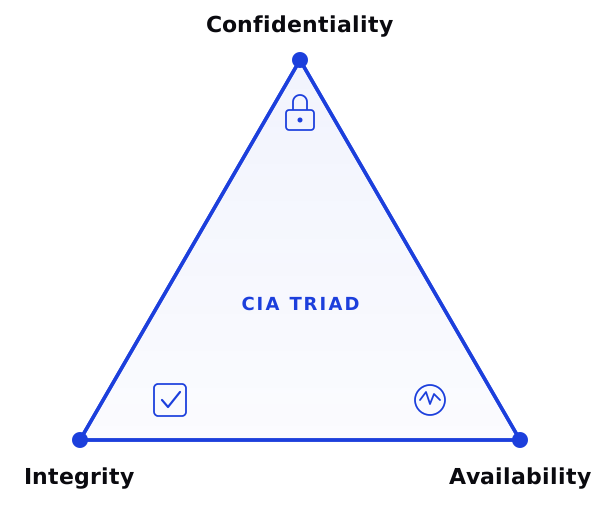
CIA Triad — Confidentiality, Integrity, Availability

Confidentiality

Who can see your data? Is your conversation private? Where do API calls go? What does the provider store?

Integrity

Can you trust the output? Has the data been modified? Is the AI hallucinating? Are the actions it takes correct?

Availability

Will it work when you need it? What if the API goes down? Do you have fallbacks? Can you run it locally?

Apply this framework: Before giving any AI tool access to your data, ask: Who can see this? (C) Can I trust the output? (I) Will it work when I need it? (A)
Breakout 2: What Data Will You Share? 9 / 17
Breakout Room

What data are you willing to share with AI?

What are your concerns? Where do you draw the line?

Open Shared Google Doc Share your thoughts in the doc
Block 3: Landscape — Evolution 10 / 17
06 — Evolution

How Did We Get Here?

AI tools exist on a continuum. Understanding the evolution helps you pick the right tool for your needs.

Chatbots
Q&A, one-off
Copilots
In-context assist
Agents
Autonomous action
Multi-Agent
Ecosystems

Benefits and Tradeoffs

DimensionChatbotsCopilotsAgents
Ease of useVery easyEasyLearning curve
PowerLimitedMediumVery high
RiskLowMediumHigher
SetupNoneMinimalSome work
Block 3: Landscape — The Continuum 11 / 17
07 — The Continuum

OpenClaw vs Codex vs Claude Code

These tools exist on a continuum. They differ in capabilities, form factors, and underlying models — but they share the same core skills.

Platform Comparison

PlatformForm FactorModelsBest For
OpenClawCLI + multi-platformAny (GPT, Claude, Gemini, local)Cross-platform agents, personal AI
Claude CodeCLI terminal + cloudClaudeSoftware engineering, automation
Codex (OpenAI)CLI terminal + cloudGPT / CodexCode generation, cloud tasks
Cursor / WindsurfIDEMultipleIn-editor coding assistance
ChatGPT / Claude.aiWeb / mobile appSingle providerGeneral-purpose chat
Learning transfer: The skills you learn here — context engineering, prompt design, tool orchestration — transfer directly to every platform on this list. Learn once, apply everywhere.
Breakout 3: Which Tool Is Right for You? 12 / 17
Breakout Room

Which tool is right for you?

Based on what you've seen, which platform fits your workflow?

Open Shared Google Doc Share which platform interests you and why
Block 4: Deployment — Options 13 / 17
08 — Deployment

Deployment Options

Where you run your agent matters. Each choice affects speed, privacy, cost, and what your agent can access.

Local Machine

  • Your laptop or desktop
  • Full access to your files and tools
  • Only runs when your machine is on
  • Easiest to get started

Server / VPS

  • Always on, 24/7
  • Can run scheduled tasks
  • Remote access from anywhere
  • More setup required

Account & Privilege Decisions

ChoiceProsCons
Fresh accountClean, isolated, safe to experimentNo existing data or context
Personal accountRich context, your real dataHigher risk if something goes wrong
Company accountAccess to team tools and dataCompliance concerns, shared responsibility
Also consider: Local AI model vs. cloud API? Each has tradeoffs in cost, speed, privacy, and capability.
Breakout 4: Your Deployment Plan 14 / 17
Breakout Room

Which deployment option is best for you?

Local or server? Fresh account or your real data? What do you want to try first?

Open Shared Google Doc Share your deployment plan
Block 4: Deployment — Coming Weeks 15 / 17
09 — Coming Weeks

What's Next

Over the next sessions, we'll go from understanding to building to deploying.

Your Learning Path

  1. Set up OpenClaw — We'll walk through the different installation methods step by step
  2. Deploy to your environment — Local machine, VPS, or Mac Mini — pick your path
  3. Connect to your tools — Wire up Telegram, email, calendar, and your other platforms
  4. Build your first workflow — Turn one of your repetitive tasks into an automated agent workflow

Session 2: Setup & Deploy

March 26 — Hands-on installation of OpenClaw. We'll walk through every method including deploying on a VPS and Mac Mini.

Sessions 3 & 4

Connect to real channels (Telegram, Slack) and build modular skills that automate your workflows end-to-end.

Closing — Consultation 16 / 17
10 — What's Next for You

Individual Consultation

This is just the beginning. The question isn't whether AI agents will transform your workflow — it's when and how.

1-on-1 Consultation

Feel free to reach out for individual support. I'm happy to visit you in person to walk you through how to set everything up.

Company Engagement

Want to help your whole company achieve the efficiency it should? Let's talk about how to make that happen.

Where is this heading? The companies that figure out AI agents now will have a massive advantage. The ones that wait will be playing catch-up.
Reach out: chinat@daydreamers.live — or grab me after the session. See you next week!
Feedback 17 / 17
Feedback

Share Your Feedback

05:00
Timer
05:00

Have any questions? Drop them in the Zoom chat.