Deploy on Render

We have $50 in free Render credits for everyone — that's about 2 months free. We'll walk through every step together.
What is Render?
Step-by-Step (we'll do this together)
- Create a GitHub account → github.com/signup (skip if you have one)
- Create a Render account → render.com — sign in with your GitHub
- Claim your $50 credit → click here to claim
- Copy the template → open this template → click "Use this template" → "Create a new repository"
- Add your AI provider API key — Render will ask for it during setup (see options below)
- Deploy it — A few clicks in Render and your agent is live
- Open your agent — Visit the URL Render gives you and start chatting
Where do I get an API key?
- OpenAI — platform.openai.com (sign up, add payment, copy key)
- Anthropic — console.anthropic.com ($5 free credit)
- Google — aistudio.google.com (generous free tier)
- OpenRouter — openrouter.ai (access to many models with one key)
Meet Ollama
Think of Ollama as the app store for AI models on your computer. Instead of paying for ChatGPT or Claude, you download open-source AI models and run them for free on your own machine.
It's like having your own private ChatGPT — no internet needed, no subscription, and your data never leaves your computer.

100% Free
No API costs, no subscriptions. The AI runs on your hardware.
100% Private
Your data stays on your machine. Nothing is sent to the cloud.
Easy to Install
One command or one download. Works on Mac, Windows, and Linux.
Install Ollama + OpenClaw
The beginner local setup is everything on one machine. Install Ollama, download a model, then install OpenClaw through Ollama.
Step 1: Install Ollama
Step 2: Download a Model
Run this to download and test the recommended model:
It will download (~6 GB) and start a chat. Type hi to test it works. When you're done, type /bye to exit.
⏱ Heads up: The download takes ~3 minutes on a fast connection, but may take longer depending on your internet speed. Be patient!

Step 3: Launch OpenClaw
Once the model works, launch OpenClaw through Ollama:
Choose qwen3.5:9b when it asks which model to use. When it's running, it should look like this:
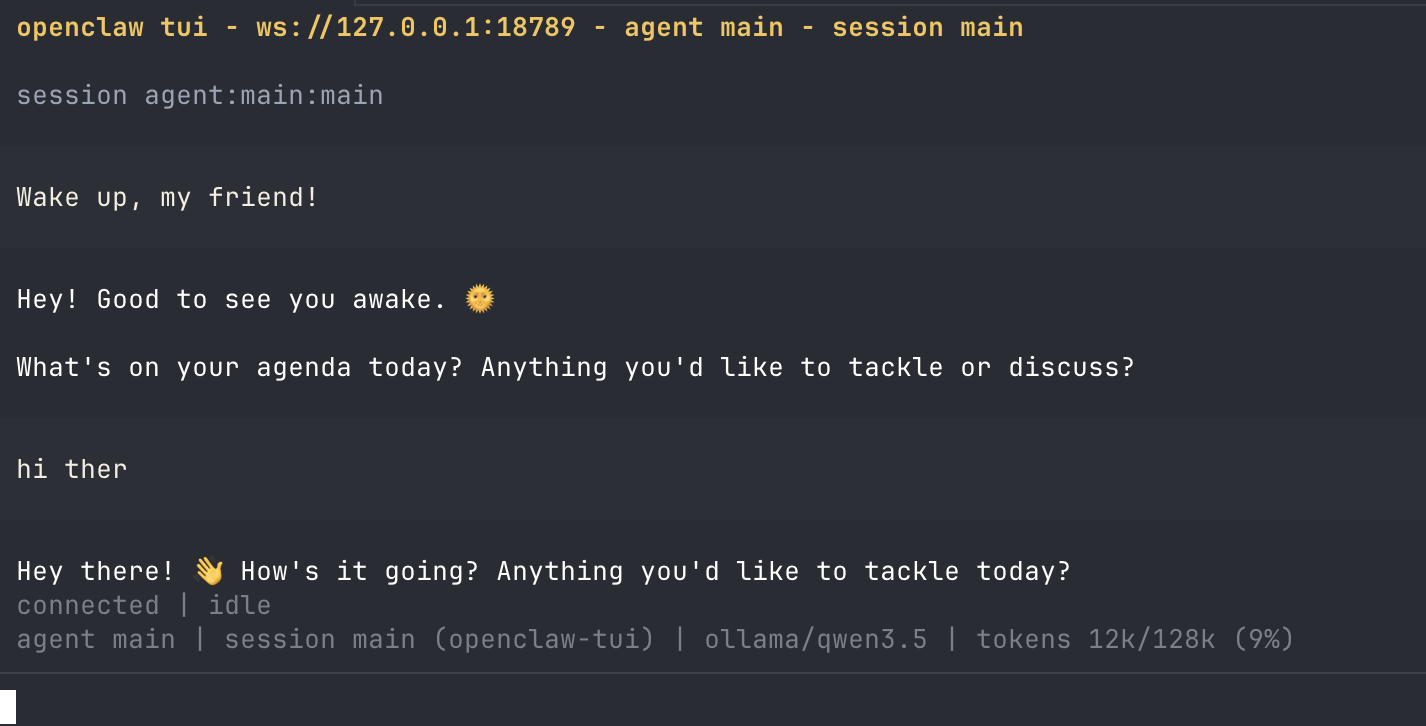
It also gives you a Web UI link you can open in your browser:

Your URL and token will be different! Copy the exact URL from your own terminal — the port and token are unique to your machine.
Choosing the Right Model
This is the hardest part of running locally. It's a balance between speed and quality. Use LM Studio to test models, then run the best one in Ollama.
Local Models (free, runs on your machine)
| Model | RAM | Speed | Quality | Best For |
|---|---|---|---|---|
| Qwen 3.5 9B | 8 GB | Good | Great | Start here |
| Qwen 3.5 27B | 24 GB | Medium | Excellent | Powerful machines |
| Gemma 3 12B | 12 GB | Good | Great | All-rounder, images |
 Llama 4 Scout 8B Llama 4 Scout 8B | 8 GB | Fast | Good | Low-power machines |
 DeepSeek R1 14B DeepSeek R1 14B | 16 GB | Medium | Excellent | Complex reasoning |
Cloud Models (needs API key or Ollama cloud tag)
| Model | How to Use | Quality | Cost |
|---|---|---|---|
 Kimi K2 / K2.5 Kimi K2 / K2.5 | ollama run kimi-k2:cloud | Top-tier | Free via Ollama |
| OpenAI (GPT-5) | API key from platform.openai.com | Top-tier | Pay per use |
| Anthropic (Claude) | API key from console.anthropic.com | Top-tier | Pay per use |
| Google (Gemini) | API key from aistudio.google.com | Excellent | Free tier available |
You can mix and match — use a free local model for everyday tasks and switch to a cloud model when you need higher quality.
Adding Models to OpenClaw
Configuring OpenClaw
After installing, you can customize your setup at any time by running:
This shows your current settings and lets you change them:
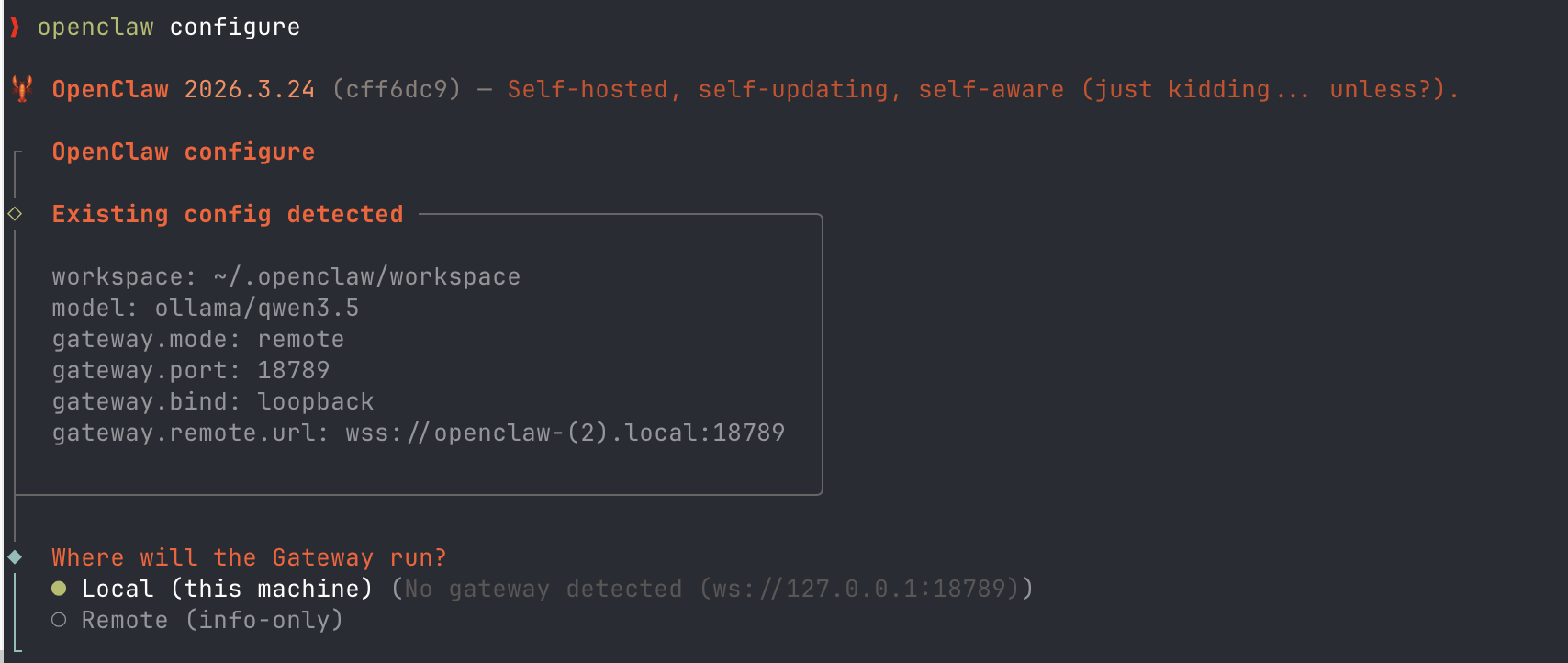
Gateway Mode: Local vs Remote
| Option | What It Means | Choose When |
|---|---|---|
| Local (this machine) | OpenClaw runs right here on this computer | This is your main machine — most people choose this |
| Remote (info-only) | Connect to an OpenClaw running on a different machine | You have OpenClaw on another computer and want to control it from here |
Tips for Success
Setup is the hardest part — but you only do it once. After that, your agent is ready to use every day.
Setup Is a One-Time Thing
The install and configuration might feel hard, but you only do it once. After today, your agent is ready to go whenever you need it.
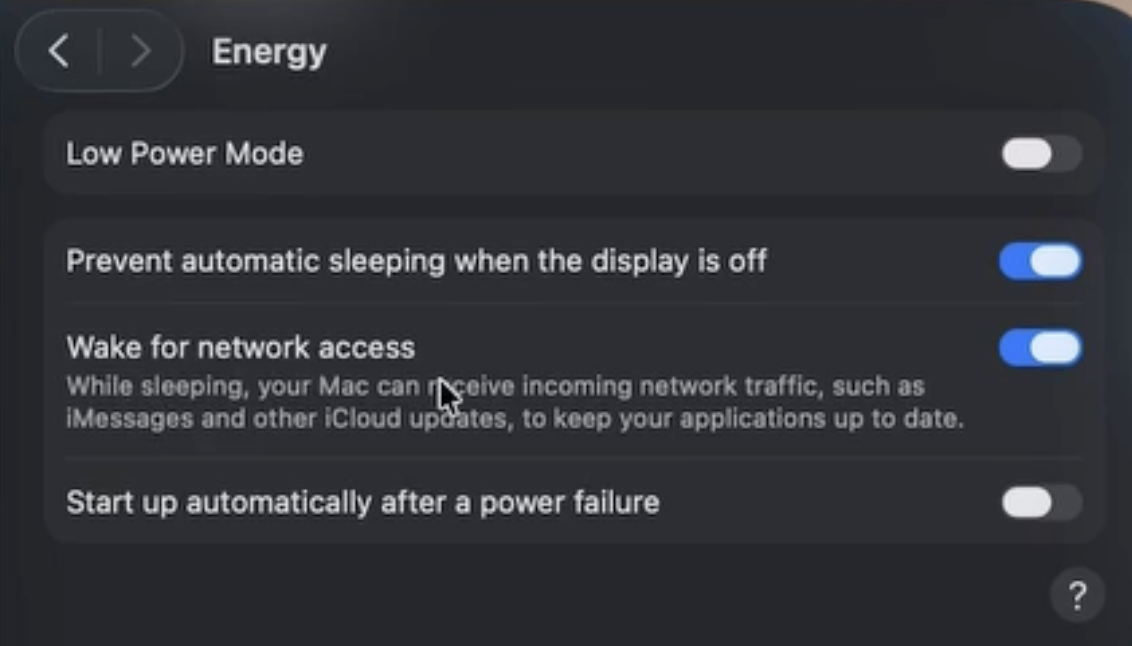
Keep Your Computer Awake
If you're running locally, turn off sleep mode and low power saving. Your agent needs the computer to stay on to keep working.
Choose the Right Model
For local: test different models to find the right balance of speed and quality for your machine. For cloud: start with whatever the default is, you can always switch later.
Tip: Use LM Studio to test different open models on your hardware before committing. It lets you quickly try out models, compare speed & quality, then run the best one in Ollama.
Connect Your Tools
Today we showed Google Drive via gog. Next week we'll connect Telegram, WhatsApp, Notion, and more — that's when it gets really powerful.
Common Issue: "models.providers.ollama.api: Invalid input"
This happens when your OpenClaw version is too old to work with Ollama. The fix is simple — update OpenClaw: